Modern client-server applications rarely operate under ideal conditions. Test environments usually have stable networks with minimal latency and no packet loss. But production environments can be very different: overloaded Wi-Fi networks, mobile connections, routes that pass through dozens of hops, and intercontinental VPNs.
Developers and testers often face a situation where the system works perfectly "in the lab," but starts failing as soon as the network becomes unstable. To predict such problems in advance, it makes sense to test applications under "poor" network conditions – with delays, packet loss, duplicates, or reordered packets.
On Linux, similar functionality is provided by tools like tc and netem, and on macOS by Network Link Conditioner.
In Windows, the equivalent tool is Clumsy – a utility for interactive degradation of a network connection, built on top of the WinDivert driver.
It allows you to interfere with packet transmission at a low level and reproduce scenarios that in real environments are caused by poor routing, congestion, or hardware issues.
Clumsy Architecture and How It Works
Clumsy does not require installation and works as a packet interceptor in user mode. It relies on the WinDivert driver, which sits below the Windows network stack and redirects packets into the application where they can be delayed, modified, or dropped.
Whenever an application sends or receives data, Clumsy intercepts each network packet, applies the selected effects, and reinjects the packet back into the stack. This makes the influence system-wide: any program can be affected, including browsers, databases, game clients, or internal services.
Here is a simplified pseudocode of the packet-processing logic:
stream = WinDivertOpen(filter)

while stream is active:
    result = WinDivertRecv(stream)

    if result has no packet:
        break

    pkt  = result.packet
    info = result.address

    # Apply artificial latency if enabled
    if lag_enabled:
        sleep(lag_duration_ms)

    # Probabilistic packet drop
    if drop_enabled:
        if random() <= drop_probability:
            continue    # packet is discarded and not reinjected

    # Inject a duplicated packet when required
    if duplicate_enabled:
        WinDivertSend(stream, pkt, info)

    # Reinject the original packet back into the network stack
    WinDivertSend(stream, pkt, info)
This reflects the core idea: each packet goes through a chain of enabled effects and is forwarded back into the network. This makes it possible to simulate various types of network degradation and observe how the application behaves.
Preparing a Test Environment
To demonstrate how Clumsy works, a simple client-server script is often enough. It sends predictable data – for example, an increasing counter and a repeated character pattern. This makes distortions easy to see: missing packets, reordered messages, corrupted bytes, or duplicates.
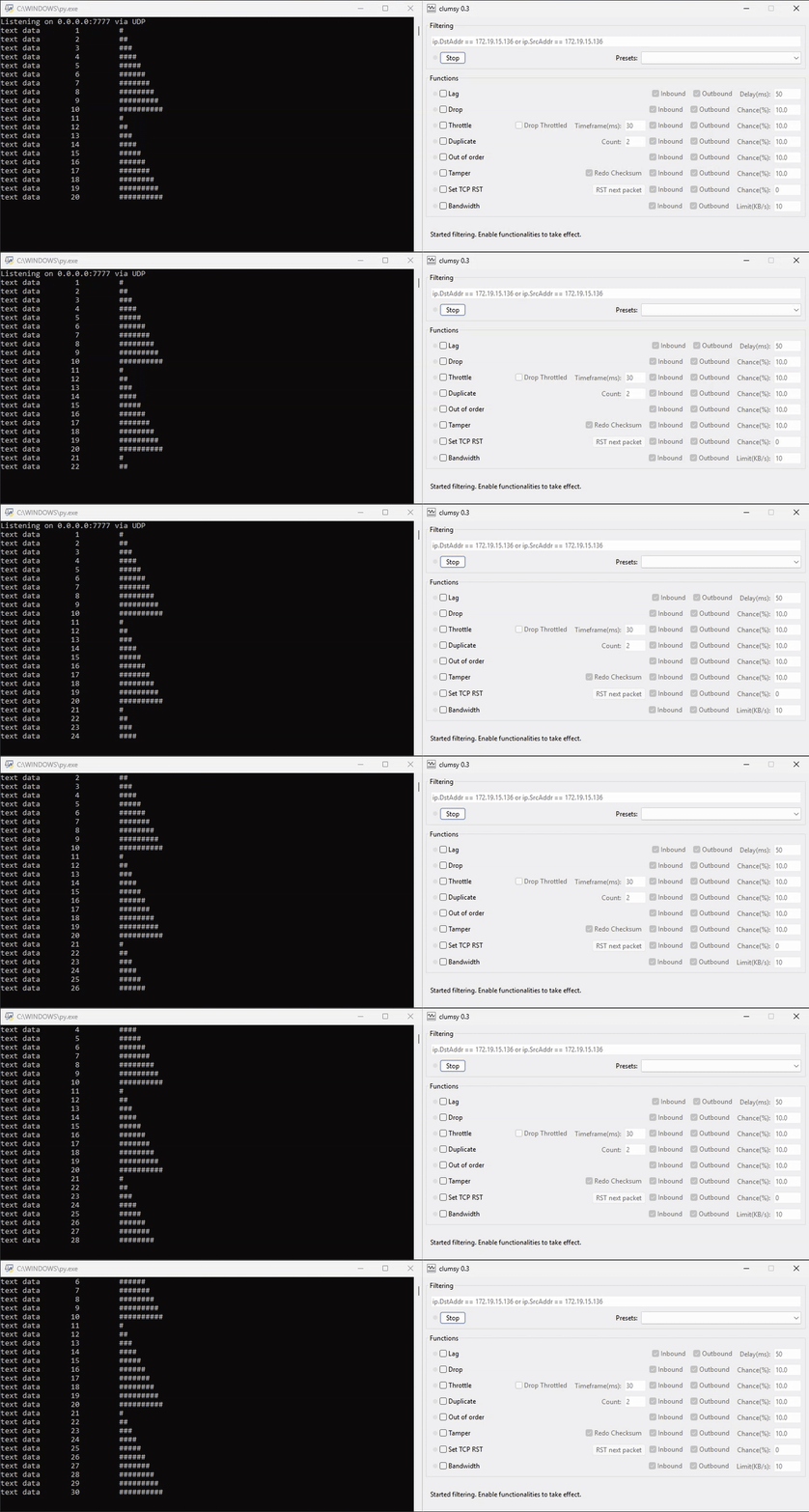
The client sends a formatted line every second, and the server prints everything it receives without trying to fix or interpret the messages.
This allows you to directly observe the consequences of network emulation: gaps, order violations, corrupted data, or duplicated messages appear in the server output immediately.
Such a minimalistic setup provides a very clear visualization of how a network behaves under load or artificial interference, making it ideal for debugging and demonstration.
Packet Delay (Lag)
One of the most common signs of an unstable network is increased latency. In real WAN environments, latency may grow due to overloaded routes, provider transitions, or long physical distances. Sometimes users hardly notice it, but for protocols that rely on strict timing, this increase becomes critical.
Clumsy allows you to introduce artificial delays on incoming and outgoing packets. With Lag enabled, you can simulate a slow connection or use the delay as a base for more complex experiments.
In practice, latency increases request execution time, slows down TCP acknowledgments, and leads to more retransmissions. Applications may encounter unexpected timeouts, especially if their logic relies on response time rather than event-driven behavior.
Packet Loss (Drop)
Packet loss is common in wireless networks, mobile connections, and heavily congested links. Even a small percentage of lost packets can seriously affect performance: TCP is forced to retransmit data, while UDP simply ignores missing packets.
Clumsy allows you to configure drop probability for both incoming and outgoing packets.
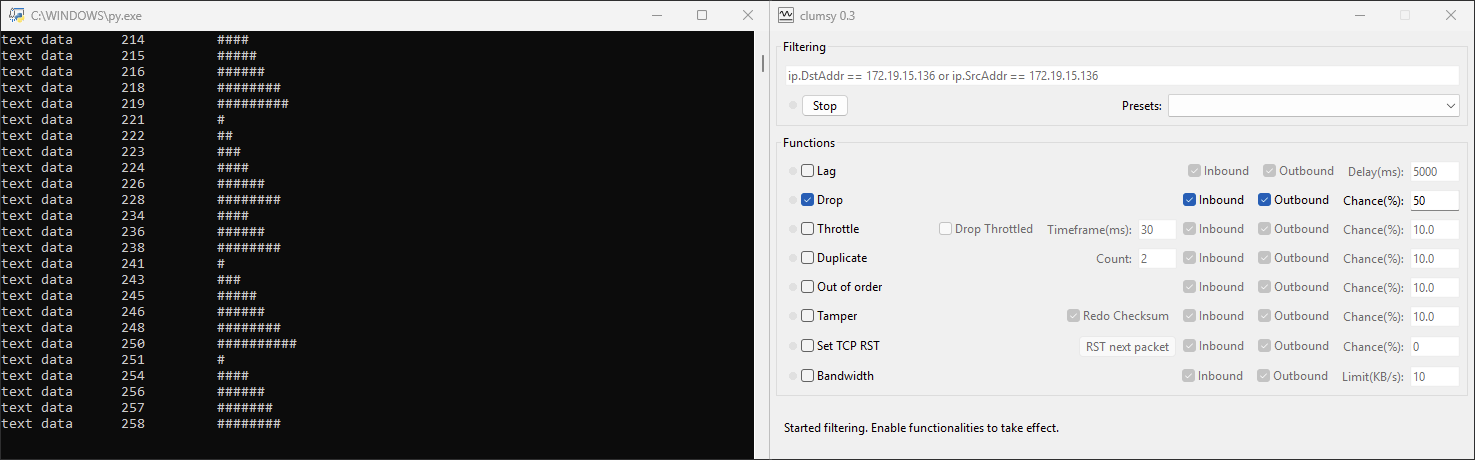
This makes it possible to test how the application behaves when:
- the connection breaks regularly,
- some requests "hang" longer than usual,
- UI components fail to receive data,
- background processes lose consistency.
Packet loss is often underestimated by developers. Even independent systems, such as distributed clusters, may experience unexpected behavior due to loss – for example, node desynchronization or incorrect failover transitions.
Traffic Blocking and "Congestion" Simulation (Throttle)
Sometimes the network does not simply lose packets – it stops transmitting data for a short period of time. This may happen due to router buffer overflow or Wi-Fi radio switching. A way to simulate this in Clumsy is Throttle, which pauses traffic and then releases accumulated packets all at once.
This scenario is useful when testing:
- client behavior during brief connectivity loss,
- message queue processing,
- retry mechanisms,
- recovery logic after a sudden interruption.
Such a "burst" can also trigger cascading effects. For example, in distributed systems a backlog of queued requests may create a race condition or lead to incorrect processing order.
Packet Reordering (Out of Order)
Most networks do not guarantee packet ordering, but many applications rarely encounter this in real use. As a result, bugs related to packet order are often hidden and appear only during targeted testing.
Clumsy allows you to reorder a portion of packets, simulating complex routing paths, asymmetric links, or unstable channels.
This feature is especially useful when testing:
- custom protocols built on top of UDP,
- streaming systems,
- multithreaded clients sending independent requests,
- logic that depends on strict message ordering.
Packet Duplication (Duplicate)
In congested networks, nodes may retransmit packets unnecessarily, causing the receiver to get duplicate messages. The TCP stack usually handles this automatically, but custom protocols or application-level handlers may behave incorrectly.
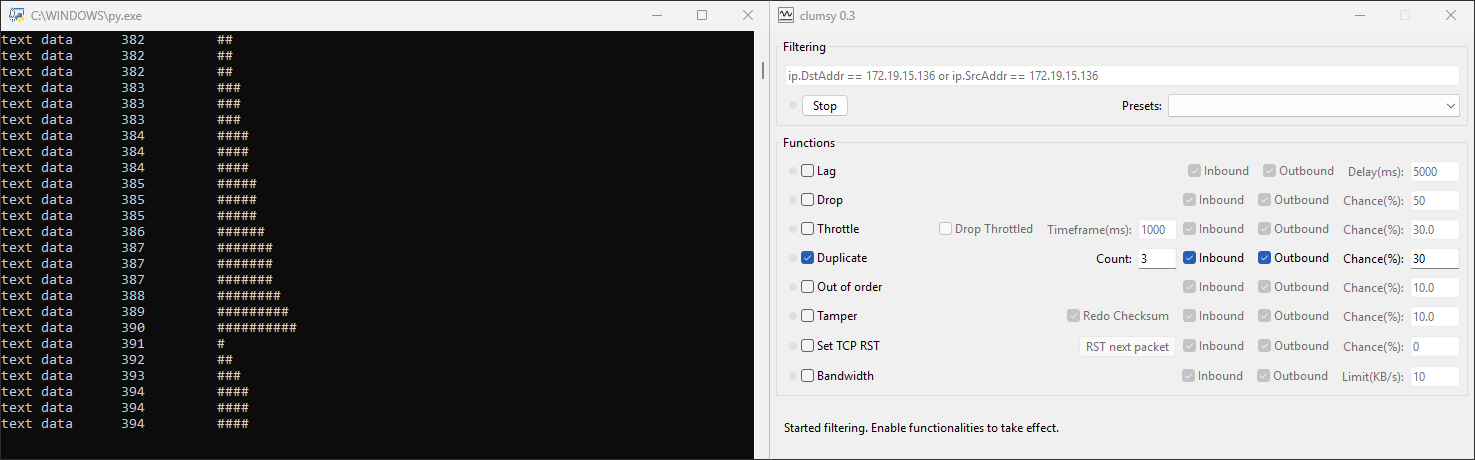
Duplication helps reveal:
- duplicate operations (such as repeated database writes or repeated event submissions),
- issues in generating unique identifiers,
- problems with API idempotency,
- synchronization failures across components.
Clumsy allows you to control the duplication percentage and the number of repeated packets.
Packet Corruption (Tamper)
Some networks not only drop packets but corrupt them due to faulty cables, driver issues, or malfunctioning routers. Clumsy can change individual bytes or header fields, allowing you to test low-level resilience to corrupted data.
Applications that do not properly validate data integrity may behave unpredictably – sometimes even crash.
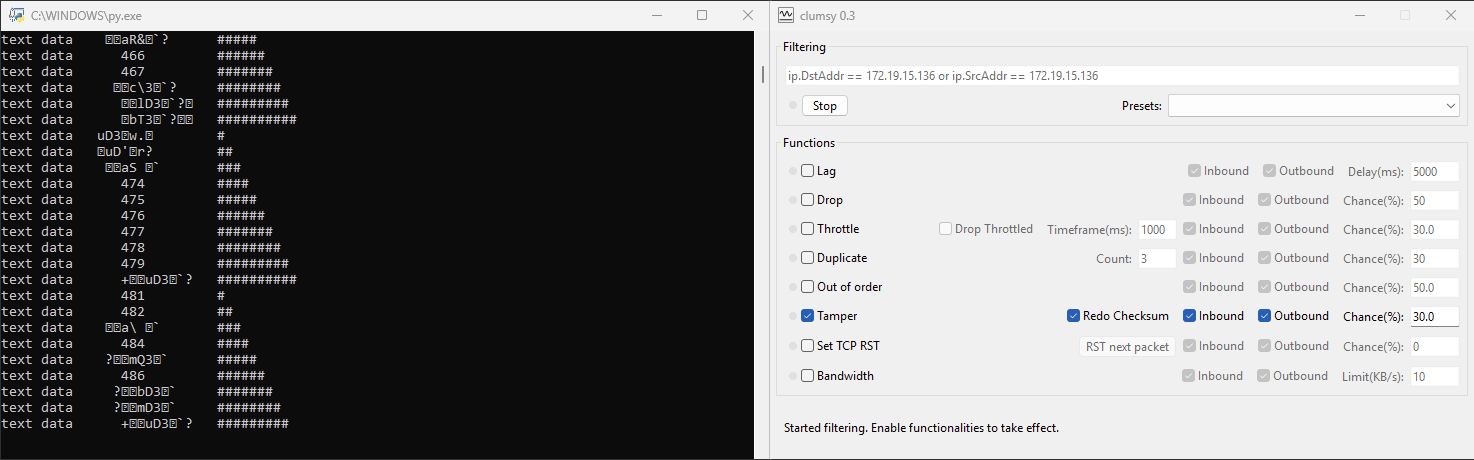
When complex serialization protocols are used, Tamper helps ensure the application correctly rejects invalid data instead of processing it as valid.
Bandwidth Limiting and Narrow-Channel Simulation
Although Clumsy is not meant as a precise traffic-shaping tool, its bandwidth-limiting option allows you to approximate real WAN conditions, such as mobile networks, public Wi-Fi, or heavy background load.
This is valuable when applications depend on transferring significant volumes of data.
By reducing available bandwidth, you can see how the application adapts: whether it scales requests down correctly, reports progress properly, or avoids excessive timeouts.
Traffic Filtering and Rule Configuration
Clumsy lets you limit its effects to specific packets: by protocol, IP address, port, direction, or TCP/UDP criteria. Filters use WinDivert syntax and allow precise targeting of the traffic you want to manipulate. This is important when you need to test a single service without affecting the entire system.
Most effects simulated by Clumsy are most clearly observable on UDP traffic.
UDP is a "raw" transport protocol that does not include built-in mechanisms for ordering, loss recovery, or error correction. When a packet is delayed, lost, duplicated, or corrupted, the application receives exactly what the network delivers.
In contrast, TCP has a sophisticated recovery mechanism: the OS automatically retransmits missing segments, smooths latency fluctuations, restores ordering, and filters duplicates. Because of this, many Clumsy effects become almost invisible to TCP applications, or appear only in a softened, corrected form.
Conclusion
Clumsy allows testers to reproduce these conditions interactively, without modifying application code or configuring external proxies.
Many network bugs appear only under complex conditions: delays in one direction, loss only on inbound traffic, corruption affecting just a subset of packets, or reordering of a small portion of data.
Clumsy is a practical tool for emulating unstable networks in Windows. It enables testers and developers to reproduce a wide range of network issues: latency, packet loss, corruption, duplication, reordering, and bandwidth limitation. It eliminates the need to create mocks, modify code, or deploy heavy testing infrastructure – everything is controlled interactively and at the system level.
Although no simulation perfectly matches real-world networks, regular testing under degraded conditions helps uncover rare and hard-to-reproduce errors, improving system stability and resilience.